


RIDE COMMAND+ Ignition Security allows you to safely, conveniently, and remotely lock and unlock your vehicle’s ignition from the Polaris App powered by RIDE COMMAND. Note: RIDE COMMAND+ Ignition Security is currently available for a specific subset of vehicles. Visit the Frequently Asked Questions (FAQ) section on the RIDE COMMAND+ website for more information on eligible vehicles.
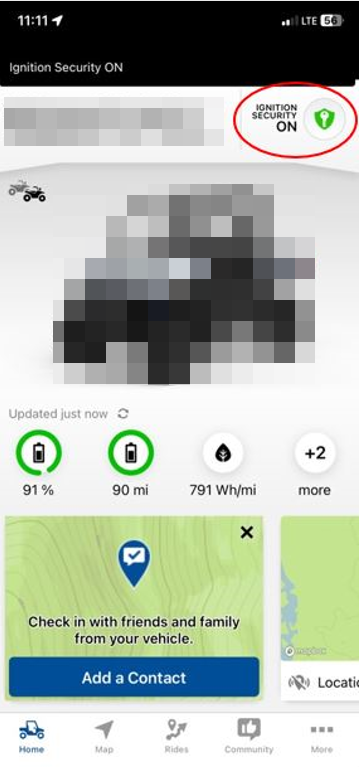
To get started, set a passcode on your in-vehicle display. Follow the step-by-step instructions in the P.A.S.S. Anti-Theft System article for more information. The Polaris App will prompt you to go through this process before you will be able to enable or disable Ignition Security via the app.
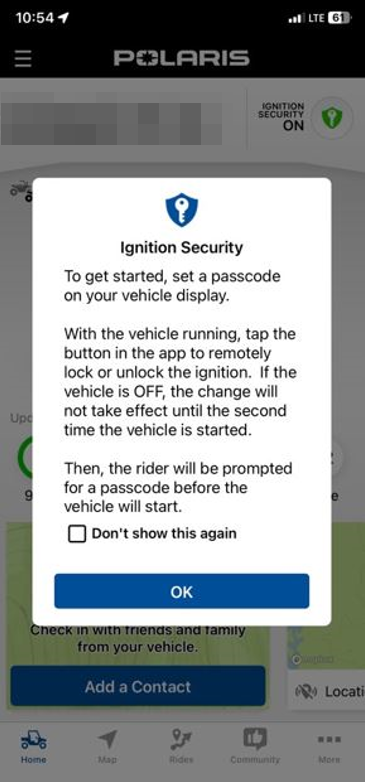
Follow the steps below to Turn ON/Enable RIDE COMMAND+ Ignition Security via the Polaris App:
1. Key the vehicle ON.
2. Open the Polaris App on your mobile device.
3. Tap the Ignition Security shield button in the upper-right hand corner of the Home screen of the Polaris App. Be sure that the correct vehicle in your Garage is selected and is shown on the Home screen of the app.
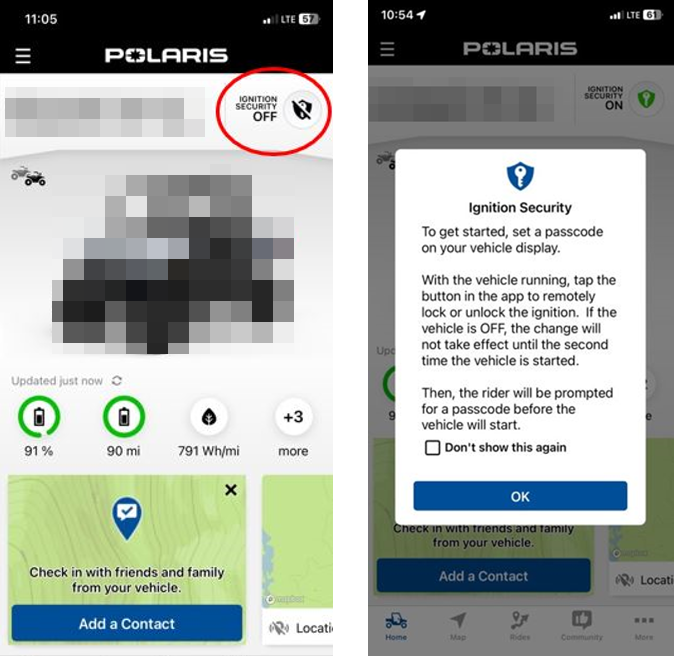
4. The app will prompt you to enter your 4-digit passcode that you previously set and entered on your in-vehicle display. Enter the 4-digit passcode in the app and tap Ignition Security ON to activate ignition security. Note: It may take up to a minute for the activation process to be completed.
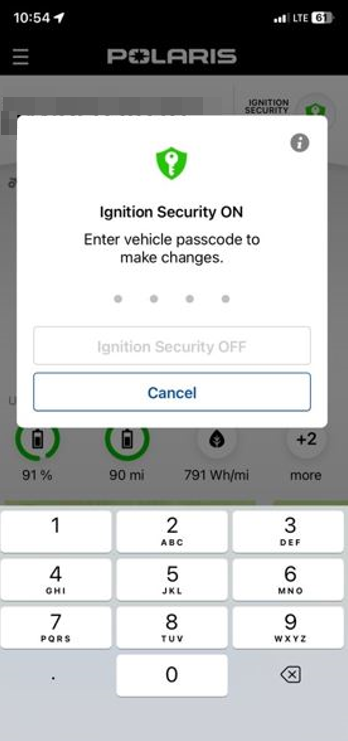
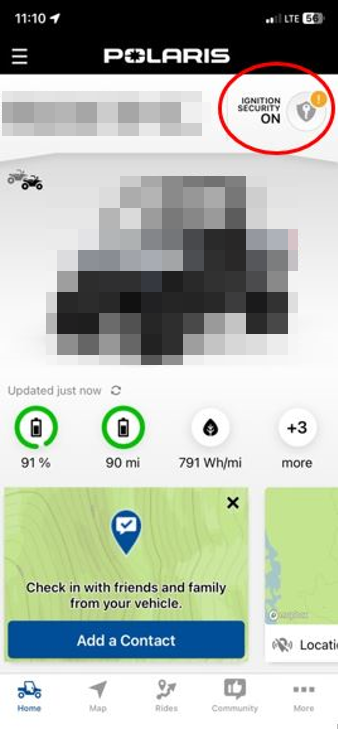
5. You will then see a green Ignition Security shield icon in the upper right-hand corner of the Polaris App Home screen that states: “Ignition Security ON.”
6. Key the vehicle OFF.
7. Key the vehicle ON. The in-vehicle display will prompt you to enter your 4-digit passcode to be able to operate the vehicle.
To Turn OFF/disable Ignition Security via the Polaris App, follow the steps below:
1. Open the Polaris App, and while on the Home screen, tap the green Ignition Security shield icon in the upper right-hand corner.
2. Enter your 4-digit passcode and tap Ignition Security OFF.
3. The Ignition Security shield icon will go into a “pending” state (see screenshot below) and ignition security will be deactivated the next time the vehicle is keyed on.
4. Key the vehicle ON. Note: You may have to wait up to one minute for the display to recognize that Ignition Security has been turned off. The 4-digit passcode prompt will be active on the display until the vehicle recognizes that the feature has been disarmed from the app.
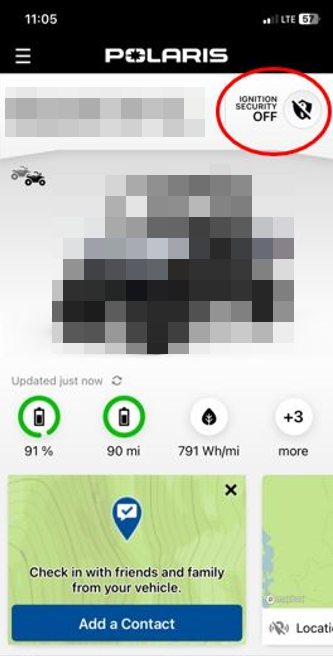
5. The Ignition Security shield button in the app will update to show that Ignition Security is OFF. The vehicle’s ignition is now unlocked.
Important: RIDE COMMAND+ Ignition Security cannot "wake" a vehicle to change the ignition security status. When enabling Ignition Security from the app when you are not with the vehicle, the Ignition Security icon in the app will remain in a pending state and will allow the vehicle to have one key cycle in which the vehicle will be operational. After this initial key cycle, once the vehicle is keyed off and then keyed on a second time, the Ignition Security feature will be enabled, prompting the user to enter the 4-digit passcode on the in-vehicle display to be able to operate the vehicle.
Note: In the event that a factory reset is performed on the in-vehicle display, RIDE COMMAND+ Ignition Security may still operate the old passcode until a new passcode is created on the in-vehicle display.
For more information about how to control ignition security and engine start lockout on the 7-button Display powered by RIDE COMMAND, please read P.A.S.S. Anti-Theft System.
To browse all RIDE COMMAND articles, read Guide to RIDE COMMAND for Off-Road Vehicles.
Visit the RIDE COMMAND website for additional information about features, displays and software/map updates.
The Polaris App is available on the App Store® for iPhone® and iPad® and on Google Play®.
Google Play® is a registered trademark of Google LLC
App Store®, iPad® and iPhone® are registered trademarks of Apple Inc.
Mapboxsm is a service trademark of Mapbox, Inc.
OpenStreetMapsm is a service trademark of OpenStreetMap Foundation
Unless noted, trademarks are the property of Polaris Industries Inc.
© 2025 Polaris Industries Inc.


